sdd-workflow
A practical Spec-Driven Development workflow for teams that want clear scope control, predictable delivery phases, and durable project context.
Getting started
bash
git clone https://github.com/avatarsik6699/sdd-workflow.git /tmp/sdd-workflow
cd /tmp/sdd-workflow
/workflow-init /path/to/target-project
cd /path/to/target-project
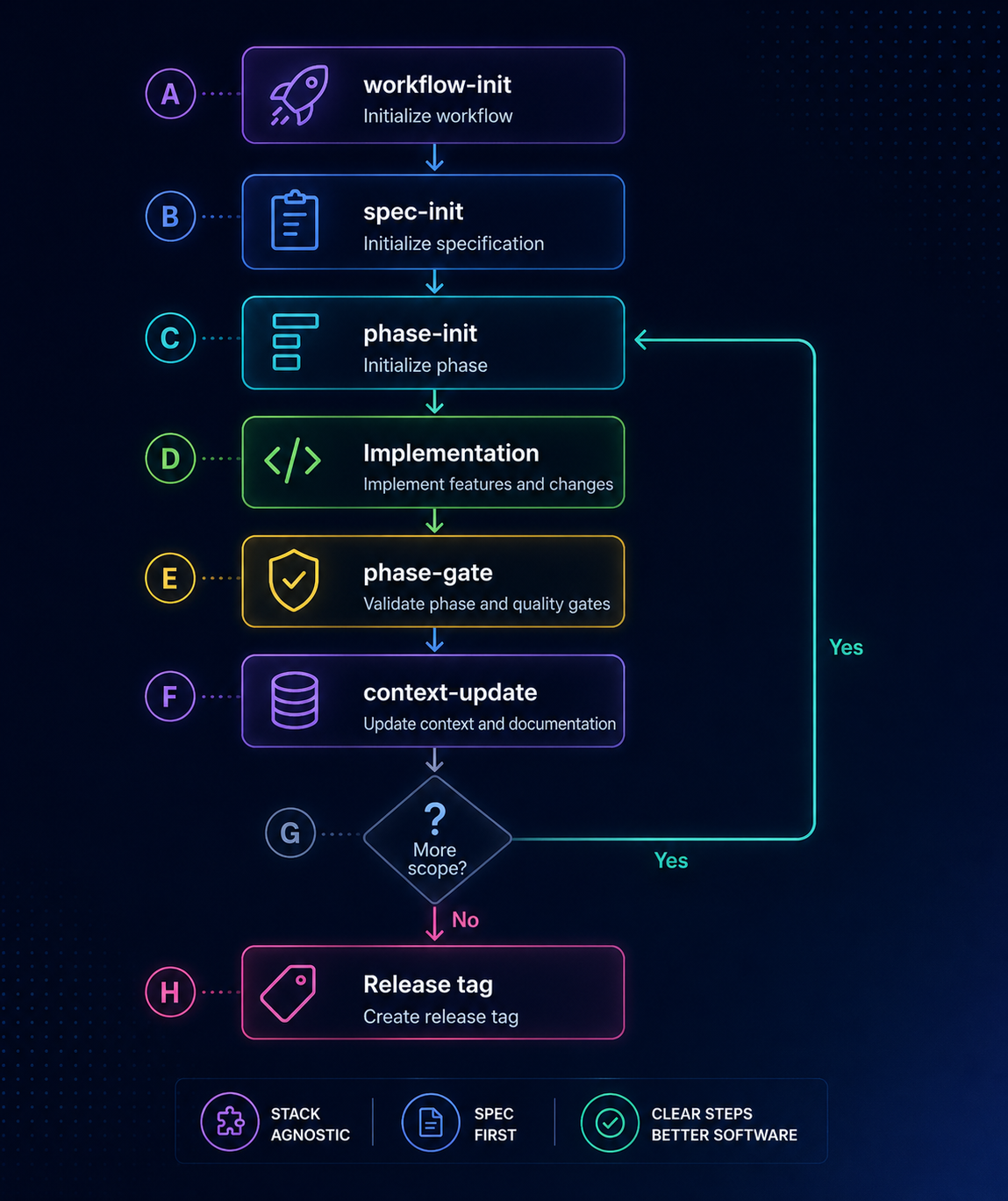
Initialize once, then repeat this cycle for each delivery phase:
/spec-init— draft or refreshdocs/SPEC.md/phase-init 01— scaffolddocs/PHASE_01.md+ task-leveldocs/PHASE_01_NOTES.md- (optional)
/impl-brief 01— generate per-task implementation plans - Implement phase scope (manually, agent-assisted, or hybrid)
- (optional)
/impl-assist 01— let the agent implement unchecked tasks /phase-gate 01— validate checks and architect review notes/context-update 01— mark phase done, sync CONTEXT / STATE / CHANGELOG- (optional)
/project-sync— push task statuses to GitHub Issues + Kanban board
What this repository provides
- Canonical playbooks (
docs/playbooks/) that define how each workflow step should be performed. - Ready wrappers for Claude Code and Codex so the same process can run in different agent environments.
- Documentation contract templates for SPEC, STATE, CONTEXT, CHANGELOG, PHASE, and PHASE_NOTES files to keep planning and execution aligned.
- Git-clone-only workflow assets with no CLI package and no runtime lock-in.
This repository is intentionally documentation-first: implementation guidance lives in playbooks, while wrappers stay thin and interface-focused.
Where to go next
Quick answers
Is this a CLI tool?
No. Commands are agent skills/wrappers, and logic lives in Markdown playbooks.
Can I use it with my current stack?
Yes. The workflow is stack-agnostic. Gate commands are configured in docs/STACK.md inside the integrated project.
Do I have to use impl-brief and impl-assist?
No. They are optional helpers. You can implement every task manually and just check off the scope checklist yourself. Use them when you want the agent to plan or implement tasks on your behalf.
Do I need a GitHub account to use this?
No. /project-sync is optional and GitHub-specific. All other workflow skills work without a GitHub remote.